What are equipment stances?
We use equipment stances to change our pawn’s posture using animation blueprints. We have the option to define a stance for every piece of equipment. In most cases we only need to do this on whatever we hold, like weapons and tools. However if you add this to every piece of equipment the system will tally up each distinct stance of all equipped gear, and notify your pawn of the one with the highest calculated score.
How do I get and use the current stance?
The equipment system will keep track of the current stance for you. It will also notify your pawn whenever it changes.
When you did the Pawn Setup you added the BPI_EquipmentPawn blueprint interface to the pawn. One of the functions implemented by this interface is called changeEquipStanceTo. This function is called by the Equipment System component when the current Equipment Stance value changes (by changes to what we have equipped).
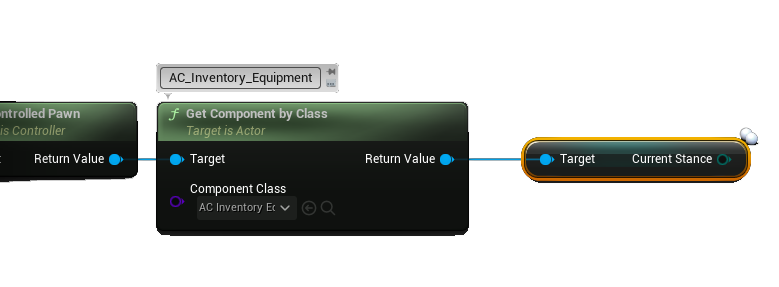
If you prefer you can also obtain the current stance through the currentStance variable inside the AC_Inventory_Equipment component. For your player this is attached to your Controlled Pawn not the Player Controller. For everything else the component is right on the actor.
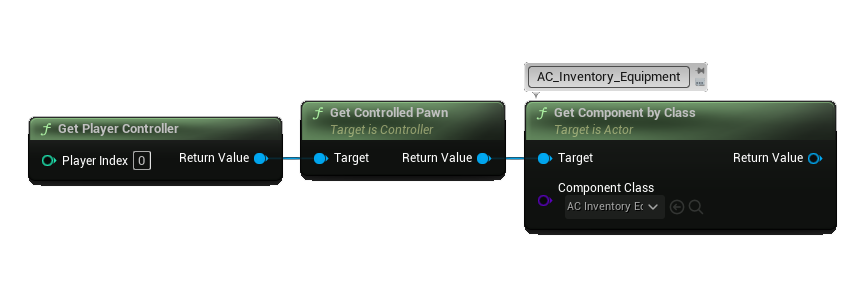
Once you have the reference to the component you get the current stance:
There is also a server side event dispatcher, onStanceChange, which you can use to get notified when the stance changes.
What you use this current stance value for is on you. The call to the changeEquipStanceTo function is the end point for the equipment system. To help you get started I've provided an example in the demo content of changing the blend space for the demo character depending on if the demo rifle, pistol or grenade are equipped. All of this can be found in the Demo Character found in the Demo/ folder. Keep reading below to learn about this example implementation ...
How do I change the blend space and camera when stance changes?
In the demo world we take it a step further to give you a few examples of using the value of this variable.
For starters when this changeEquipStanceTo function is called on our demo character we save our current stance in a variable on the pawn. We replicate this variable using a rep notify, and when the rep notify function triggers it will handle changing our camera mode and camera target arm length if the stance comes through as Throwable, Pistol or Rifle. When it is not one of these stances we set the camera back to the default values.
We also use this stance variable’s value in our animation blueprint to drive our locomotion state machine.
This is not the only approach to handling these functions, it is however the simplest way to show the majority of people how it can work. You can just as easily use animation layers, or any other method you prefer. Remember, how you use the value of this variable is entirely up to you but please keep in mind the endpoint for the equipment system is the call to changeEquipStanceTo function.
At minimum you will want to have a basic understanding of using animations. If your plan is to just adapt what I’ve done you will need to know how to retarget the animations and set up your locomotion.
 Please keep in mind this is an intentionally simple example to help beginners get started on the subject of stance changing. It is also provided as a demo content example, not a core or documented part of the asset. There are better ways to handle this like with animation layers however this is beyond the scope of this asset. If you have questions regarding anything up to the changeEquipStanceTo call I will be available to help and offer you support. Anything beyond that call is not my area of expertise and you should consult with an animation expert on what you should do instead.
Create a new equipment stance
Use the E_EquipmentStance enumeration in the Blueprints/Variables/Enums/ folder to add new equipment stances. This is all you need to do, you can now set your equipment stance for each equipment item in your DT_Equipment data tables.
Default Equipment Stance
You can set the default equipment stance for your player in the Equipment configuration of the AC_InventorySystem component attached to your player controller. By default it is set to Unarmed.
For NPCs you can set the defaultStance on the AC_NPC_Equipment component. For everything else you can set the defaultStance right on the AC_Inventory_Equipment component.