Equipment refers to the items a pawn wears, like helmets and boots, or holds, such as weapons and tools.
You can use this system to equip static and skeletal mesh assets, as well as custom blueprints. It works with both modular and single mesh characters.
All of our equipment logic occurs inside of the AC_Inventory_Equipment component found in the Blueprints/Components/Systems/ folder. For the player this component is added to our possessed pawns.
In this system equipment is defined in the DT_Equipment data table in the Blueprints/Variables/DataTables/ folder. The association to items is done using the same row name in both the DT_Items and the DT_Equipment data table.
The AC_Inventory_Equipment component has the onEquipmentChange and onEquipmentChangeUI event dispatchers which you can bind into to get notified of equipment changes.
We use functions provided by the BPI_Equipment blueprint interfaces to set up our pawn. These methods provide the framework our equipment system needs to define what mesh component, and sockets on it are used, as well as what animations are played from equipment actions.
We use equipment handlers to handle our visuals as well as define custom functionality. We also have the option of injecting custom Input Mapping Contexts and UMG Widget UIs based on the equipment when it is equipped. We can also equip custom blueprints for advanced implementations.
We let the player decide what items are equipped using the equipment window, and optionally the hotbar. With the equipment window we define specialty slots to control what items can go in each slot, and the hotbar acts as an extension (if the slot is not defined in the equipment window) or an override (if it is defined).
There is also an optional equipment validation step which can be used to check custom requirements. This is handled using a blueprint interface on your player controller.
Get the Equipment System Reference
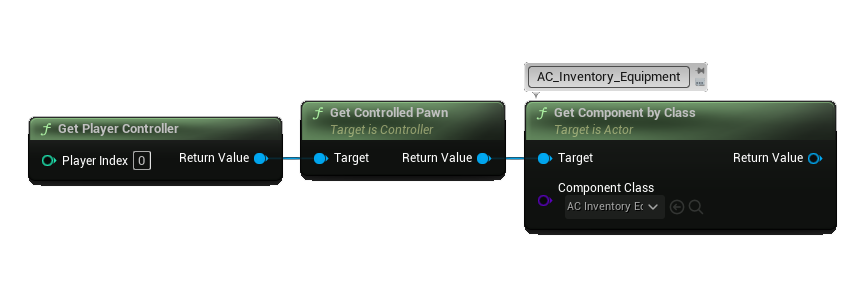
In this version there is only one component AC_Inventory_Equipment, and it is added to the pawn for both players and actors. To get the reference you would simply use the getComponentByClass function on the pawn and select AC_Inventory_Equipment.