The loot system provides a way for you to spawn items as rewards when the player kills an enemy, or loots a treasure chests. You can also use it to spawn containers of loot, as well as make the player drop their loot.
How the Loot System Works
The functionality is added through the AC_Inventory_Loot component, which you can add to your actors. For our player this is enabled through the AC_InventorySystem we added to our player controller. See the PlayerLoot Configuration section for the settings. For everything else this component should be placed right on the actor.
Spawning Loot
When we spawn loot is controlled by our own logic, and we spawn the loot by calling the spawnLoot function on this component.
Setting What Loot Spawns
We configure the items that spawn when loot is generated using the following configurable variables on the component:
Spawning Loot from the Player
The AC_InventorySystem component you added to your player controller has a number of configurable variables related to looting. Navigate to the Configuration / PlayerLoot section to change the variables associated with the player. You should find all the variables listed above to configure what items are lootable from the player.
When you are ready to spawn the loot on the player you would get a reference to this AC_Inventory_Loot component on the player controller then call the spawnLoot function, like this:
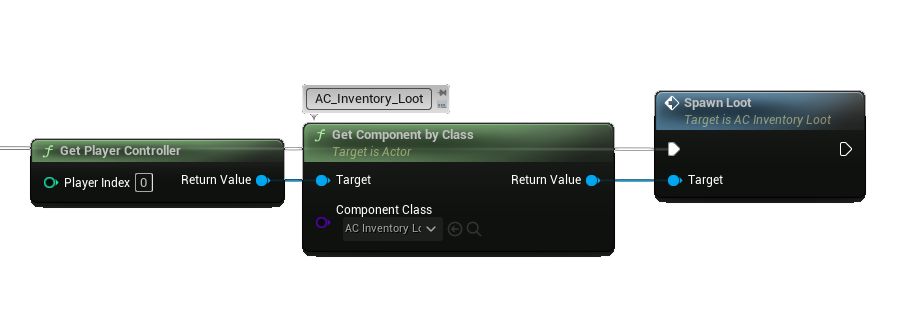
Using this exact code above works great in single player but in multiplayer it will always loot the server/host player. This is because in multiplayer we need to make sure we provide the correct player controller reference, as well as run the code from the server.
If you would like to see a multiplayer example of this check out the demo world Loot section. This area includes a button that when you step on it will spawn the player loot, ragdoll the player, and then respawn the player. You can find the button in the Demo/MapHelpers/ folder, it is called BP_Button_SpawnLootOnPlayer.
Loot Tables
Loot tables can be created and modified inside the DT_LootTables data table found in the Blueprints/Variables/DataTables/ folder. Referencing a loot table is done using the Row Name, then the items of each Loot Table is defined through the Table array for each row.
Each array element in this row has the same settings that are used when manually defining hand placed loot items on the component. To recap, each item lets you define the row name, the dynamic data overrides, a quantity and a max quantity (if not -1 it will randomly roll between quantity and max quantity, if -1 it will just use the quantity value), and a loot chance (which is a value between 0 and 1 indicating the chance that the item spawns as loot, where 1 is 100% and 0.42 is 42% chance.).
If you would like to manually roll the dice on a loot table you can use the rollLootTable function found in the BPO_Helpers object. You will need to construct the object first, then from its reference call this rollLootTable function. You can provide the following:
On the output of this function it will return the array of WinningItems. You will then need to iterate through this array to award your items to the proper component.
Keep in mind the loot system does all this for you, and you would only need to call this function if you have a purpose to manually roll a loot table to generate a list of items from outside of the loot system.
Loot Boxes
A loot box is a usable item that when used will spawn loot in our player inventory, often by using a loot table.
The AC_UsableItemHandler_LootBox is our base class. It is an abstract class, which means you can't use it directly but must first inherit from it and use that instead.
When you make a child of the AC_UsableItemHandler_LootBox base class you will be customize each of these variables.
How the Demo World Loot Box Examples Work
The usable item handler for our demo world lootbox is AC_UsableItemHandler_LootBox_LootTableData which is a child of the AC_UsableItemHandler_LootBox (abstract class). We use our child class to configure the variables provided by the base class. Then we run the logic of the parent using the Call Parent event. This handler will check the dynamic data of the item for the loot.table key, and use its value as the loot table row name. This handler will also look for the loot.luck key, and if found will use it as the LuckModifier, which is the minimum dice roll value.
In the demo world there are also a few examples of reusable loot boxes with and without charges. These are driven with the usable items system which is looking for the charges dynamic data key. If this key is provided, the value is the number of charges the loot box can be used before it is destroyed. The system will track how many are remaining. If the value provided is set to -1 then this acts as a reusable item with unlimited charges.
View the Usable Items chapter to learn more about how they work, and the charges variables.
Treasure Chests
In this version I've provided a treasure chest example to help you get started awarding loot to your players using a classic method!
Introducing the Treasure Chest BP
The base treasure chest class is BP_Interactable_TreasureContainer. This is an abstract class, so you can't use it directly, instead you need to inherit (make a child) from it and use that blueprint instead. For example, we inherit from this class to make our red and gold treasure chest included in the demo world. This actor is the BP_Interactable_Container_TreasureChest blueprint found in the Demo/Containers/TreasureChest/ folder.
Defining the Treasure Chest Loot Items
These are the variables found on each instance of a treasure chest. You can customize them inside your child blueprint, or from the details panel of the instance you hand placed in your level.
How it Works ...
While treasure chests sound like they would be part of the loot system, this blueprint doesn't actually use our loot component. The component is better suited for spawning loot on things we don't directly interact with, and a treasure chest is just another interactable container with hand picked or randomly generated items. We already know we want the items to spawn in the chest, and the chest is already placed, so we avoid all the extra overhead used to handle this in the loot component by simply bypassing it.
To make it work we utilize the storage component's starter items system to handle our loot. The starter items system fully supports all the same loot related variables including hand picked and loot tables. For our treasure chest we can customize these variables in the Loot category of the details panel on the treasure chest. These values are injected into the storage component on begin play, and since we have saving disabled, the loot items are always freshly generated.
Deeper under the surface both the starter items system and the loot component share the RollLootTable helper function (mentioned above). This is why they both have the same variables. The loot components true purpose is adding extra functionality on top of it, functionality that we don't need for our treasure chest actor.
After the chest is opened by a player the respawn part kicks in. The respawn timer only counts down when the chest is not being used by a player. It will pause while the treasure chest is in use. This was designed this way to prevent players from camping at a treasure chest with it open, which would deny other players the opportunity to try and claim it on the respawn.
About the demo treasure chest
The demo example handles the visual and audio experienced related to our red and gold treasure chest. By default it shows as a closed treasure chest until it has been opened, after which it will stay opened (until loot respawns if enabled). If items are still in it after being opened you will see a layer of gold coins and a bright light emitting from it. When the items are gone it is still shown as an opened chest but without the layer of gold coins and light.
What happened to the Loot Window from Previous Versions?
For developer usability and simplicity of the code I decided to retire the loot window found in previous versions and instead expanded on the container system to handle our loot related needs. It is a more streamlined approach that doesn’t depend on extra custom functionality and user interfaces, and it does give the player a familiar interface when interacting with a loot container.
I am on the fence about this change, so if it is something you would like to see returned in the future please let me know!